 OberBuilt Inventory
For QuickBooks® Online
Beta
OberBuilt Inventory: build assemblies in QuickBooks Online.
Write down what goes into each product once. See what is short before you start. Finish a build and, in QuickBooks Online, the parts come out of stock and the product goes in at their cost.
One plan: $19.99 CAD in Canada or $14.99 USD in the United States, per month plus applicable tax.
- No credit card to start the trial.
- One monthly price. Cancel yourself, any time.
- Hosted in Canada, on hardware we own.
- Made by OberBuilt Inc. in Winnipeg, Manitoba.
QuickBooks Online Plus and Advanced have no build assemblies.
Moving from QuickBooks Desktop? QuickBooks Online Plus and Advanced track inventory, but they have no step that turns components into a finished product and carries the components' cost into it.
Today in QuickBooks Online Plus and Advanced
- A build is entered by hand: components out, finished goods in, the cost worked out yourself.
- Component lists live outside your books, often in a spreadsheet.
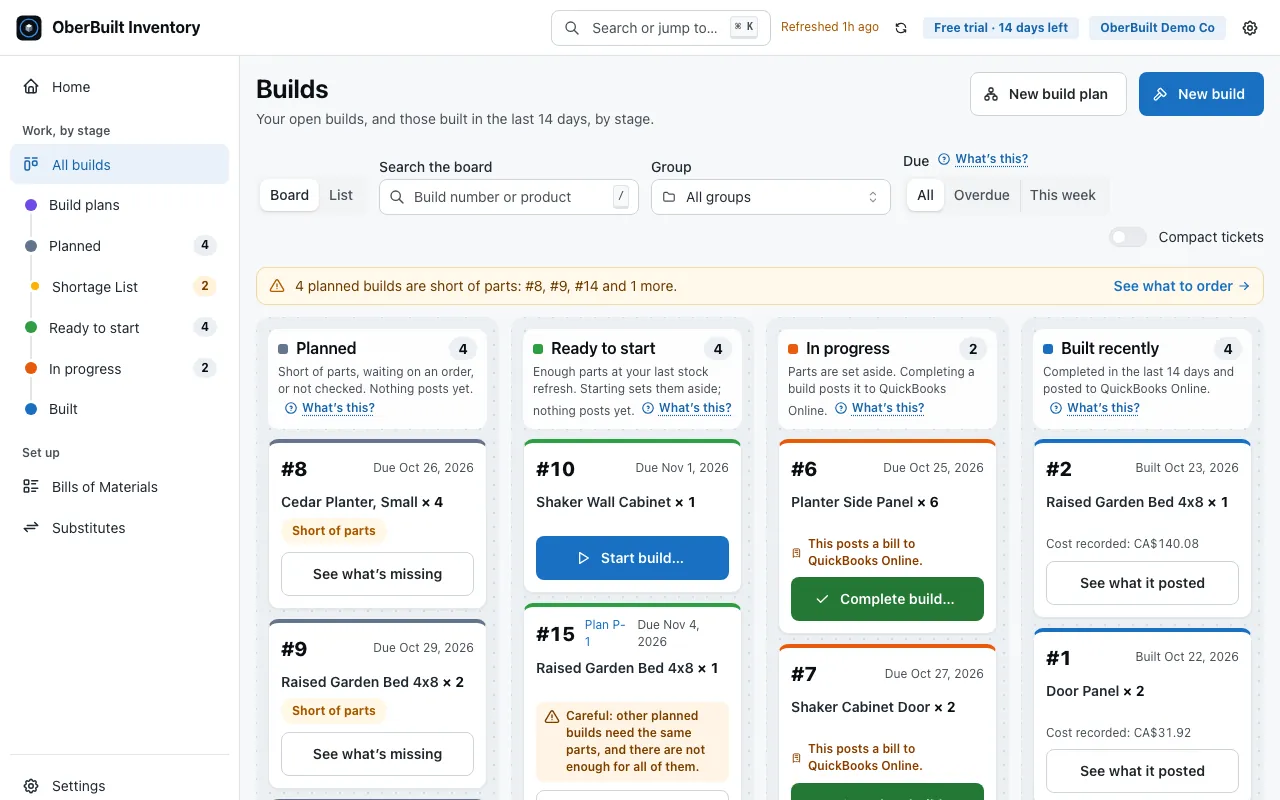
- QuickBooks Online doesn't show which parts your planned builds are short.
With OberBuilt Inventory
- Write each bill of materials once, with sub-assemblies as deep as you need.
- Complete a build and it is posted to QuickBooks Online at the FIFO cost QuickBooks Online recorded.
- A shortage list covers every planned and in-progress build.
From planned to posted
Connect.
Connect your QuickBooks Online company. Your items, quantities and open purchase orders come across.
Define.
Write a bill of materials once, with sub-assemblies as deep as you need, and see the rolled-up cost.
Build.
Plan a build, start it, complete it. Components come out of stock and finished goods go in, at the FIFO cost QuickBooks Online recorded (first in, first out: the oldest stock is costed first). Print a pick list. One for each build, ready for the shop floor.
Posted.
Completing a build posts one bill to QuickBooks Online.
What it does
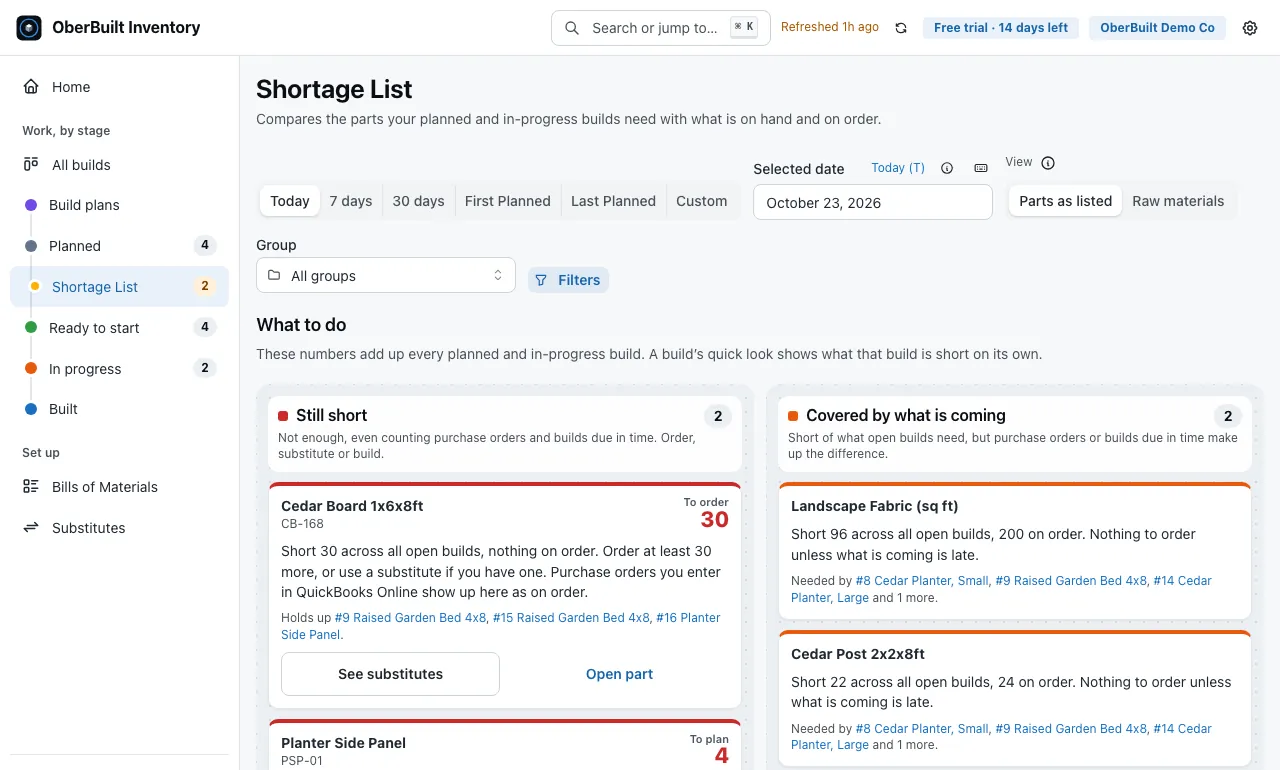
See shortages before they stop you.
Across planned and in-progress builds, net of open purchase orders due in time.
Bills of materials, as deep as you need.
Sub-assemblies at any level, groups to keep them in order, and a rolled-up cost for each.
Un-build at the original cost.
Reversing a build whose finished goods are still on hand returns the components at the cost the build was made at, not today's cost. Un-building can also change the cost QuickBooks Online recorded for later sales or adjustments of the items involved, so check the Inventory Valuation Detail report in QuickBooks Online afterwards.
Plan every level at once.
A build plan makes a planned build for each sub-assembly you need, using stock first if you choose.
Substitutes when a part runs short.
Name the items that can stand in for a part. When a build is short, choose one as you start it.
Your data is yours to take.
Export bills of materials, builds and items as CSV at any time, including for 90 days after a trial or subscription ends.
What a build posts to QuickBooks Online
The first question a bookkeeper asks. Completing a build posts one bill. Your first build also creates the internal supplier described below.
| Item | Qty | Amount |
|---|---|---|
| Cedar board, 1×6 | −6 | −48.60 |
| Deck screws, box of 100 | −1 | −9.20 |
| Cedar planter, large | +1 | 57.80 |
| Total | 0.00 |
One bill for each completed build. Its number is B- and the build number, and it is dated the day the build is completed. Planning or starting a build writes nothing to QuickBooks Online.
Components out, finished goods in. Components go out at negative quantities, at the FIFO cost QuickBooks Online recorded. The finished product comes in carrying their total, so the lines net to zero.
An internal supplier, never paid. The supplier is a record created on your first build, and must never be paid. Un-building all of a build deletes its bill, and un-building part of it changes the bill. An un-build can also re-send another same-day build's bill (Terms, section 9.3).
Is it right for you?
- Works with QuickBooks Online Plus or Advanced, with "Track inventory quantity on hand" turned on in its settings.
- Available in Canada (except Quebec) and the United States. In the United States, that means the 50 states and the District of Columbia, not its territories.
- OberBuilt Inventory is in beta. It writes builds into your QuickBooks Online books, so check its results there before you rely on them (Terms, section 3).
- It plans builds for the sub-assemblies at every level of a bill of materials, down to a depth you choose.
- It does not do work orders, purchase planning, scheduling, lot or serial tracking, barcode scanning, shipping or multiple warehouses.
One plan. One price.
$19.99 CAD
per month in Canada, plus applicable tax
$14.99 USD
per month in the United States, plus applicable tax
Starts with a 14-day free trial. No credit card needed. We never turn a trial into a paid plan without a payment method on file. One free trial per QuickBooks Online company.
Add a card before the trial ends to keep using the app. If you don't, the trial simply ends: nothing is charged, access to the app's features stops, and you can still export your data for 90 days before we delete it.
Start 14-day free trial- Each subscription covers one connected QuickBooks Online company.
- Prices do not include sales tax. If tax applies to your billing address — GST/HST, and Manitoba RST or Saskatchewan PST where required — Stripe calculates it and adds it to every invoice, except on a subscription created while it could not be calculated, until tax is turned on for it (Terms 12.3); when you start a subscription on Stripe's checkout page, the full total, tax included, is also shown there before you confirm.
- Your subscription renews automatically every month and keeps renewing until you cancel. Each renewal is charged to the payment method on file at the then-current price, plus any tax that applies.
- You can cancel at any time, yourself, in the Stripe billing portal — no email or phone call needed. Your subscription then continues to the close of the billing period you have already paid for, or of your free trial if you are still on it, ends there, and you are not charged again.
The app shows you the current price before you enter a card. Any tax that applies is added on your invoice.
Made by people you can reach
A real company
OberBuilt Inc., in Winnipeg, Manitoba. Write to support@oberbuilt.ca.
No artificial intelligence, no trackers
We do not process your data with artificial intelligence or a large language model, for any purpose, and use no third-party analytics or advertising trackers (Privacy Policy, section 20).
Questions
Do I need a credit card to start?
No. The 14-day trial starts when you connect your company. Each QuickBooks Online company gets one free trial.
What happens when the trial ends?
Add a card before the trial ends to keep using the app. If you don't, the trial simply ends: nothing is charged, access to the app's features stops, and you can still export your data for 90 days before we delete it.
How do I cancel?
You can cancel at any time, yourself, in the Stripe billing portal — no email or phone call needed. Your subscription then continues to the close of the billing period you have already paid for, or of your free trial if you are still on it, ends there, and you are not charged again.
Where is my data kept?
Your inventory stays in your QuickBooks Online company. Our copy of it, and every backup, stays in Canada, on hardware we own in Winnipeg. Billing details are handled by Stripe, in the United States. The Privacy Policy lists everyone who handles your data.
Which QuickBooks Online plans work?
Works with QuickBooks Online Plus or Advanced, with "Track inventory quantity on hand" turned on in its settings.
Can I bring over my QuickBooks Desktop assemblies?
Not automatically. Intuit's move to QuickBooks Online brings your items across, but QuickBooks Online Plus and Advanced have nothing that builds from an assembly's component list, and OberBuilt Inventory doesn't import those lists. You set up each bill of materials once, choosing components from the items already in your QuickBooks Online company. Every build after that uses it.
Is this made by Intuit?
No. OberBuilt Inc. is not affiliated with Intuit.
Try it on your own company.
Your inventory stays in QuickBooks Online.